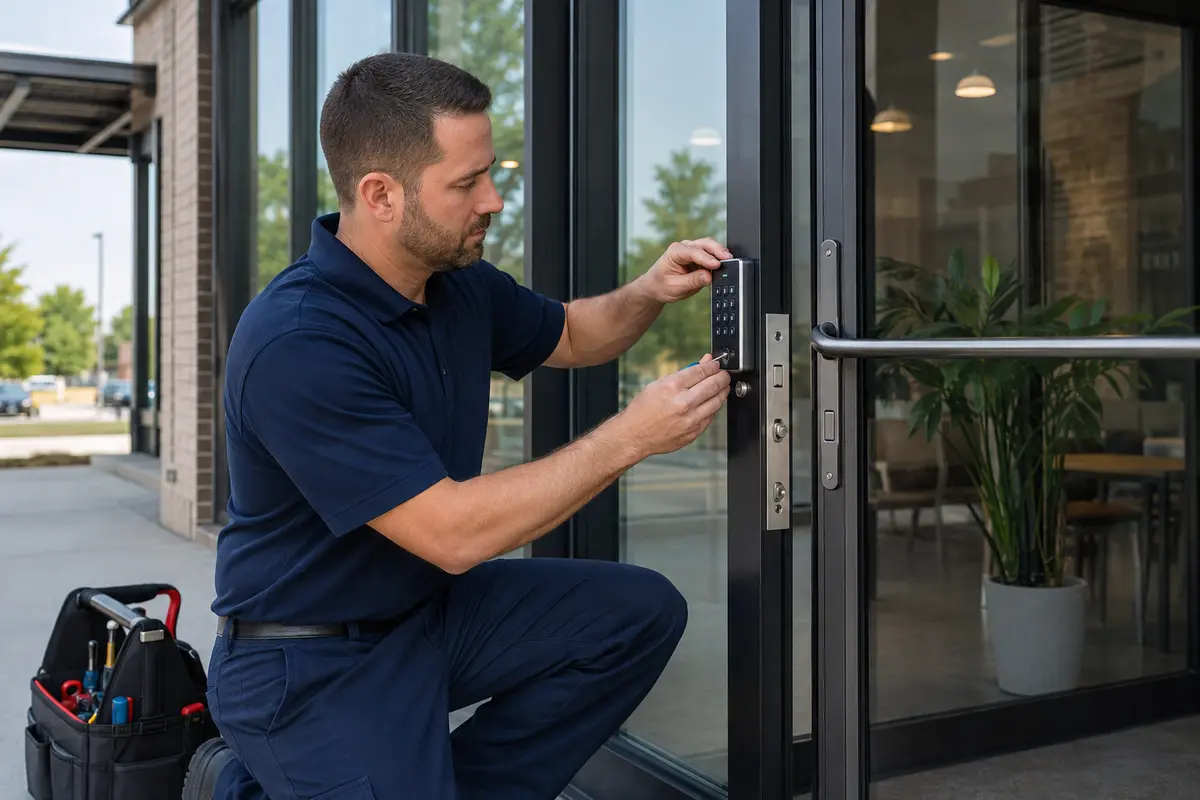
Commercial locksmith
Keypad, Card, or Mobile Access? Choosing Credentials for a Wichita Business
A keypad, card reader, fob, or phone can all unlock a commercial door, but they do not create the same day-to-day experience. The best credential depends on who needs access, how often permissions change, what records matter, how the doors are built, and who will administer the system after installation. This Wichita business guide compares the practical tradeoffs without turning a credential choice into a brand contest.
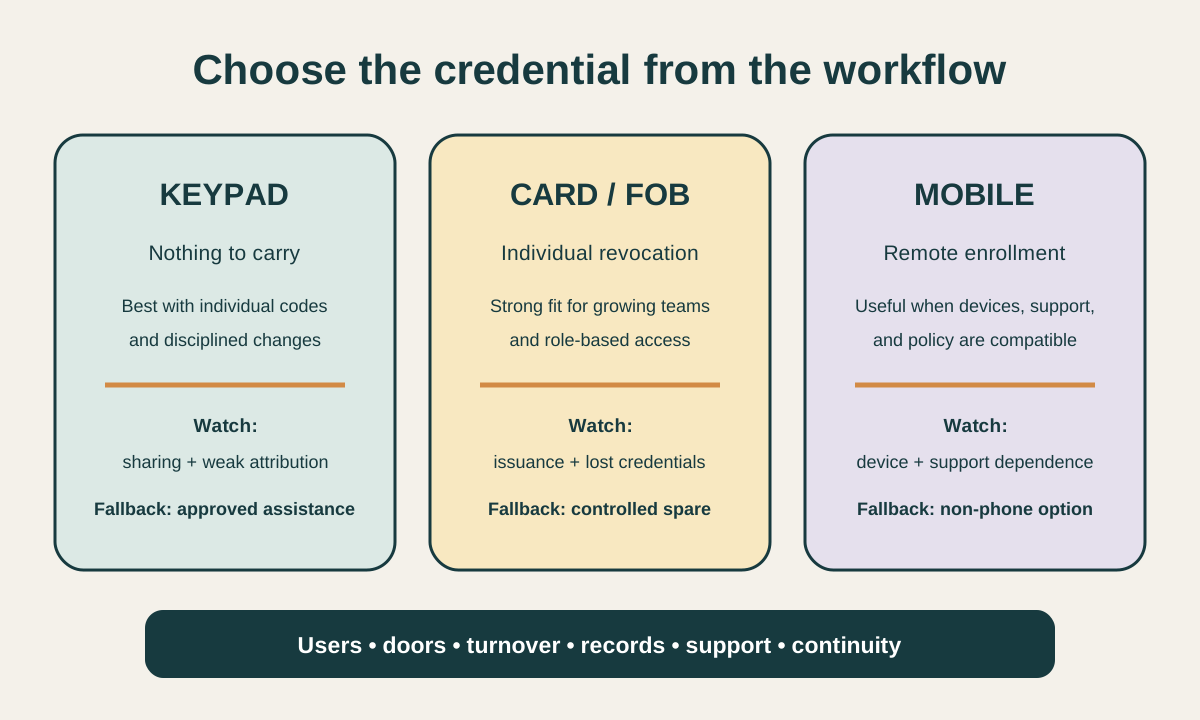
Choose credentials from the operating policy backward. Keypad codes can suit a small, stable group when sharing is controlled; cards and fobs give each person a distinct credential that can be revoked; mobile credentials can reduce another item on the key ring but depend on compatible phones, enrollment, support, and a workable backup. Whichever method you choose, inspect the complete door, preserve safe exit, define power and outage behavior, name an administrator, and test the real opening before handoff.
A keypad, card reader, fob, or phone can all unlock a commercial door, but they do not create the same day-to-day experience. The best credential depends on who needs access, how often permissions change, what records matter, how the doors are built, and who will administer the system after installation. This Wichita business guide compares the practical tradeoffs without turning a credential choice into a brand contest. Continue with the complete library of commercial locksmith guides when you want to compare related decisions.
Key takeaways
- Credential choice follows users, doors, schedules, turnover, records, and administration—not appearance.
- Shared codes are simple but become difficult to attribute and control as the user group grows.
- Individual cards, fobs, or mobile credentials make revocation and event attribution more practical.
- Electronic access still depends on a sound door, frame, latch, closer, exit function, power, and network design.
- A complete handoff includes enrollment, removal, backup entry, outage behavior, testing, and protected records.
Begin with the access policy, not the reader
A credential is how a person presents an identity or permission at the door. It may be a memorized code, a physical card or fob, a phone-based credential, or a combination chosen for a particular group.
The reader is only the visible edge. Behind it are users, access levels, schedules, controllers, locking hardware, power, network connections, event records, mechanical overrides, and an administrator who has to keep the information accurate. If this condition matches your situation, review the service scope for access control installation.
Write the business rules in ordinary language before comparing products. Identify employees, managers, cleaners, vendors, contractors, delivery staff, tenants, and visitors.
For each group, list the doors they need, the hours they need them, how quickly permission must be added or removed, and whether the business needs to know which individual used the opening. A stable five-person office and a changing multi-shift facility should not be pushed toward the same credential model.
Separate convenience from accountability. A code that everyone remembers may feel easy until a former worker still knows it or a door event cannot be tied to one person. A card assigned to each employee can improve revocation and records, but it creates issuance, return, replacement, and inventory work.
A phone can reduce physical credentials, yet it brings device compatibility, enrollment, privacy expectations, battery condition, and support questions. The right choice is the one the business can manage consistently.
Who needs access?
Map employees, managers, vendors, cleaners, visitors, and temporary users by role.
Which doors and zones?
Separate public entry, staff entry, inventory, offices, equipment, and shared-building openings.
Who will administer it?
Name the person who enrolls, changes, suspends, reviews, and documents credentials.
Compare keypad codes in real operations
Keypads are familiar because they require nothing to carry. They can work well at one or a few suitable doors serving a small group with low turnover, especially when the system supports individual codes rather than one code shared by everyone.
A code can also be useful for time-limited vendors when the platform supports schedules and the business actually removes access afterward. Simplicity depends on disciplined administration, not merely on the number pad. If this condition matches your situation, review the service scope for commercial locksmith services.
Shared codes lose control as they travel. A staff member may tell a cleaner, a vendor may pass the code to a substitute, and a former employee may remember it after departure.
If ten people use one code, an event record shows the code, not necessarily the person. Changing the code restores control only when every authorized person receives the new one and old copies disappear from notes, messages, documents, and habit.
Ask how the keypad handles individual users, temporary access, schedules, failed attempts, lockouts, audit events, administrator permissions, and backup entry. Decide whether the door must work locally if a network service is unavailable and how authorized entry continues during a power problem.
Avoid predictable codes tied to the address, phone number, or obvious dates. Codes should be distributed through an approved process rather than posted near the door or sent through an uncontrolled group message.
| Operating condition | Potential strength | Management risk | Question to settle |
|---|---|---|---|
| Small stable team | Nothing physical to issue | People may share the code | Can each person receive a unique code? |
| Temporary vendor | Permission may be scheduled | Access may remain after the job | Who confirms expiration or removal? |
| High turnover | Code changes can be quick | Frequent changes disrupt authorized users | Would individual credentials be easier? |
| After-hours entry | Schedule rules can limit use | A shared code weakens attribution | Is person-level event history required? |
| Power or network interruption | Some systems continue locally | Behavior varies by design | What exact fallback is approved? |
Understand cards and fobs as individually managed credentials
Cards and fobs can give each authorized person a distinct credential. When an employee leaves or a credential is lost, the administrator can suspend that item without changing access for everyone else.
The system can associate permitted events with a named record, subject to the business's policy and platform configuration. This usually scales more cleanly than shared codes when the team, doors, or access levels grow. If this condition matches your situation, review the service scope for panic bar installation.
The physical credential still needs a custody process. Decide who orders, stores, assigns, returns, replaces, and destroys cards or fobs.
Keep a record of credential identifier, named holder, issue date, access level, status, and return or suspension date without publishing sensitive system data. A box of unlabeled spares and an old spreadsheet with unknown owners can erase much of the control that individual credentials were meant to create.
Technology and compatibility matter. Credentials that look alike may use different frequencies, formats, encryption capabilities, or proprietary ecosystems.
A proposal should identify the supported credential family, reader and controller relationship, enrollment method, supply path, future availability, and migration plan. Do not buy inexpensive look-alike cards before the system design is verified; a badge can be printable and still be electronically incompatible or unsuitable for the desired security level.
- Assign one credential to one named person whenever practical.
- Record issuance, access level, status, return, loss, and replacement.
- Keep unissued credentials controlled and inventory them periodically.
- Suspend lost and departed-user credentials promptly under a documented process.
- Confirm credential technology and future supply before purchasing a large quantity.
Treat mobile access as an operating model, not a feature
Mobile credentials can let an authorized user present a compatible phone or wearable instead of carrying another card. Enrollment and removal may happen remotely, and the user may be less likely to lend a personal device casually.
Those benefits are strongest when the organization has compatible devices, a supported platform, a clear enrollment workflow, and someone available to resolve ordinary issues. Mobile access is not automatically simpler merely because the credential is digital.
Define what happens when a phone is replaced, lost, unavailable, discharged, offline, or incompatible. Decide whether employees are expected to use personal devices, whether the business provides alternatives, how privacy questions are explained, and what help is available outside ordinary office hours. A business should not discover at the door that an operating-system update, enrollment email, app account, Bluetooth setting, wallet configuration, or device policy changes how entry works.
Credential administration belongs inside a broader risk process. The NIST security and privacy control catalog (opens in a new tab) includes physical and environmental protection, access control, identification, audit, incident response, and contingency concepts that organizations can tailor to their needs. A Wichita small business is not automatically required to implement a federal control catalog, but the structure is a useful reminder: authorization, records, removal, monitoring, backup, and response need owners alongside the reader and credential.
Match credential types to roles instead of forcing one answer
A business does not always need one credential type for everyone. Employees may use cards, managers may have a controlled mechanical override, short-term visitors may receive escorted or scheduled access, and a small approved group may use mobile credentials.
Mixed systems can be practical when the policy is intentional and the platform supports the combination. They become confusing when each door was purchased separately and nobody can explain which record controls what.
Build a door-and-role matrix. Put the doors down one side and user groups across the top. Mark routine access, scheduled access, temporary access, no access, and emergency or override responsibility.
Add the credential type and administrator for each rule. This reveals overbroad access, exceptions that deserve review, doors that do not need electronic control, and users who need a reliable alternative because a phone or card will not fit their work conditions.
Choose the smallest workable permission for each role. Convenience should not turn a delivery credential into office access or give every employee the same reach as a manager.
At the same time, overly narrow rules can cause people to borrow credentials or prop doors when daily work is blocked. Review the matrix with the people who understand opening, closing, deliveries, maintenance, emergency procedures, and staff turnover before the system is configured.
| Need | Credential pattern to consider | Administration focus | Important fallback |
|---|---|---|---|
| Stable small office | Individual codes or cards | Named users and prompt removal | Approved mechanical or managed assistance |
| Multiple shifts | Individual cards, fobs, or mobile | Schedules, role groups, lost credential response | After-hours support path |
| Frequent vendors | Temporary scheduled credential | Sponsor, start, expiration, and review | Reception or authorized escort |
| High-turnover workforce | Individually revocable credential | Fast onboarding and offboarding | Controlled spare process |
| Mixed device access | Card plus mobile options | Consistent identity and duplicate control | Non-phone alternative |
Inspect the complete door and communications path
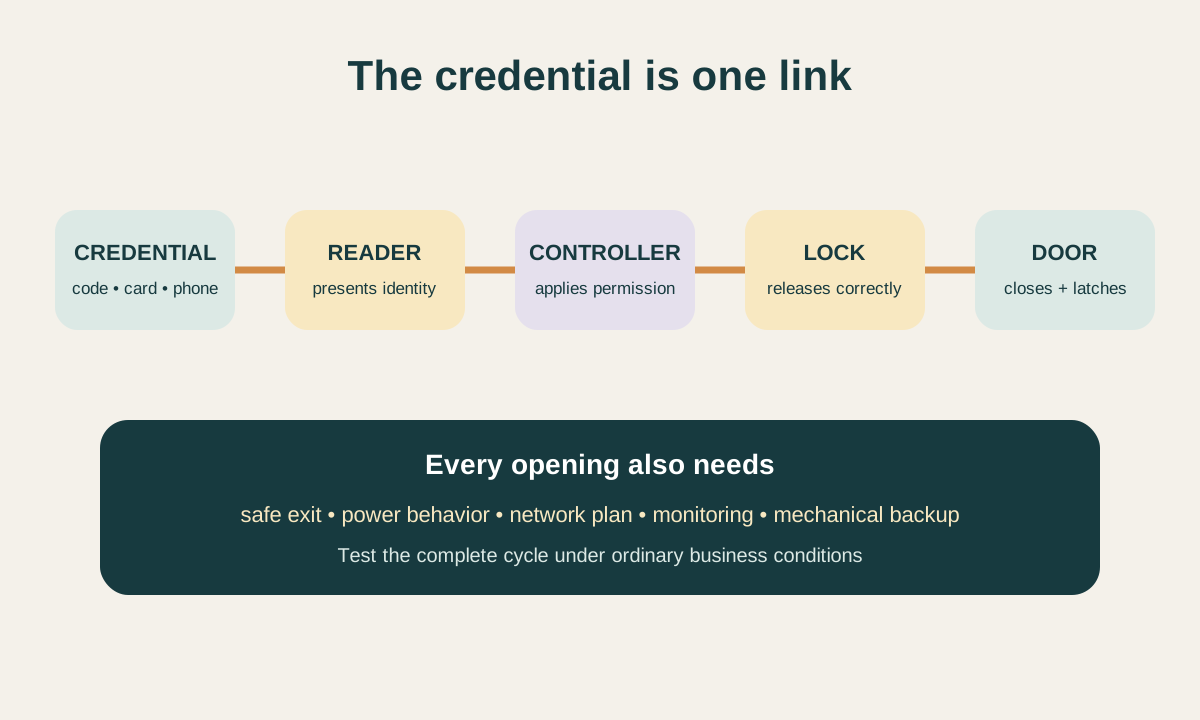
A credential cannot compensate for a door that drags, a closer that fails to latch, an exit device that binds, or a strike that is not aligned. Before selecting a reader, inspect the door, frame, hinges or pivots, closer, latch, exit hardware, seals, threshold, and existing lock preparation.
Identify fire labels, required egress, accessibility considerations, automatic operators, alarms, and shared-building controls. The electronic design must work with the physical opening under ordinary traffic.
Then map the communications and power path. A reader presents data to a controller; the controller applies permissions and sends an instruction to compatible locking hardware.
Power supplies, batteries, network services, cloud connections, request-to-exit devices, door-position switches, alarms, and management software may participate. The written design should explain what happens when power, network, cloud service, a controller, a reader, or the locking component is unavailable.
Interoperability questions belong in the proposal. The Security Industry Association overview of OSDP (opens in a new tab) explains a communications standard used between access-control panels and peripheral devices such as card readers, with goals that include interoperability, cybersecurity, supervision, and device management.
That does not make every OSDP-labeled product suitable or mutually compatible. Ask what protocol, secure configuration, verified devices, firmware responsibility, cabling, and commissioning are included in the actual project.
Mechanical fit
Door, frame, latch, closer, exit hardware, seals, and alignment must support dependable operation.
Power and communication
Readers, controllers, locks, network, batteries, and interfaces need defined ownership and behavior.
Failure scenarios
Decide how authorized entry and required exit behave during each realistic interruption.
Preserve egress, accessibility, and privacy
Electronic access controls entry; it must not create an unsafe or confusing exit. Interior release, panic or fire-exit hardware, request-to-exit functions, door closers, latching, fire-alarm interfaces, and power-loss behavior may be regulated or essential to the opening.
Never chain, block, or defeat an exit because the access system is not working. The person leaving should not need a credential, phone, special knowledge, or an administrator's approval where free egress is required.
Usability includes more than the reader height. Approach space, reach, visual and audible feedback, door opening force, closing speed, threshold, timing, and the interaction between a credential and an automatic operator can affect people with disabilities.
Exact requirements depend on the building and scope. Include the property representative and qualified design or code professionals when an alteration affects a regulated opening, listed assembly, occupied exit, or automatic door.
Event records also deserve a policy. Decide what the system records, why the business needs it, who may review it, how long it is retained, and how requests or investigations are authorized.
Avoid collecting data merely because the platform can. Protect administrator accounts, use appropriate authentication, limit broad privileges, remove departed administrators, and store exports and credentials in approved locations rather than ordinary shared messages.
Compare proposals by the complete installed result
A proposal that lists readers and credentials without door work, power, controllers, software, licensing, enrollment, testing, and support is not a complete comparison. Ask for a door schedule that identifies each opening, its existing condition, planned locking method, reader, credential types, interior release, monitoring, power, communications, finish, and remaining mechanical override. The schedule should also assign work among the locksmith, door provider, electrician, alarm company, network administrator, access integrator, landlord, and tenant.
Separate one-time and recurring costs. Hardware, cabling, door preparation, installation, configuration, cards or fobs, mobile credential licenses, cloud subscriptions, cellular connections, software support, training, replacements, and future additions may be priced differently. Ask what happens if the subscription ends, a credential is replaced, another door is added, the manufacturer discontinues a product, or the business changes administrators.
Compare the acceptance plan and warranty as carefully as the equipment. The provider should test authorized and rejected credentials, schedules, door position, entry, interior release, closing, latching, relocking, alarms or integrations in scope, power behavior, network behavior, and the documented fallback. A low proposal that leaves commissioning, user import, administrator training, or door alignment to the customer can cost more once those missing tasks surface.
| Scope area | What should be named | Useful question |
|---|---|---|
| Doors | Opening condition and exact hardware function | What correction makes each door mechanically dependable? |
| Credentials | Types, quantities, technology, enrollment, and replacements | Who owns and pays for the credential lifecycle? |
| Infrastructure | Controller, power, batteries, cabling, network, and software | What continues during each interruption? |
| Administration | Roles, training, records, and support | Who can add, suspend, review, and recover administrators? |
| Closeout | Tests, documents, warranty, licenses, and exclusions | What evidence proves the complete opening works? |
Commission the system and hand over control
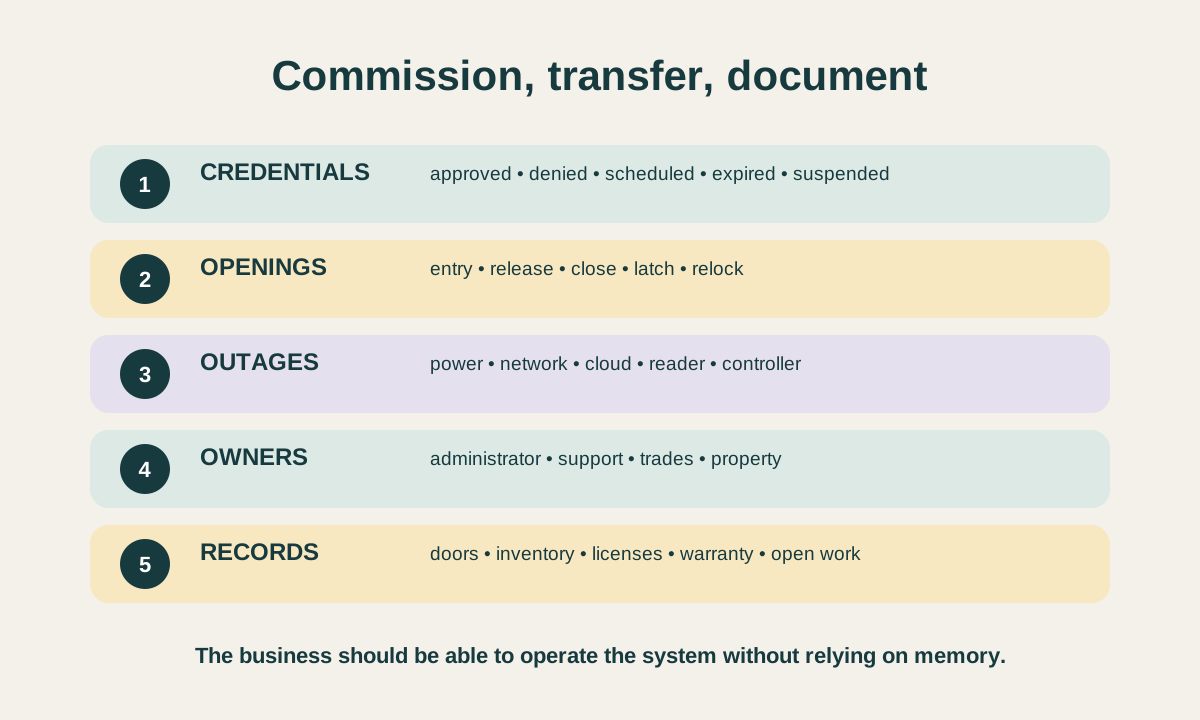
Commissioning should follow the actual user journey. Present each approved credential type, confirm the intended decision, operate the door, enter, release from inside, allow the door to close normally, verify latching and relocking, and confirm the event record when included.
Test rejected and expired credentials without disclosing sensitive configuration. Repeat the sequence at every controlled opening and under the schedules the business will use.
Demonstrate realistic interruptions in a controlled way. Confirm the documented behavior for loss of normal power, backup power, network service, cloud service, reader communication, and other agreed scenarios without disabling a required exit or creating unsafe conditions.
Verify the mechanical override and who controls it. If testing requires another trade or service provider, schedule that coordination rather than marking an untested integration complete.
The authorized administrator should receive a door schedule, credential inventory, administrator list, enrollment and removal process, backup and outage instructions, installed product information, licenses, warranty, support contacts, test results, and a list of remaining work. Sensitive passwords, recovery codes, cryptographic details, and protected system records belong in an approved secure location. The closeout is complete when the business can run the system responsibly without depending on one person's memory.
- Test each credential type for approved, denied, scheduled, expired, and suspended behavior.
- Prove entry, interior release, closing, latching, relocking, and event reporting at every door.
- Confirm documented power, network, cloud, and communication behavior safely.
- Transfer controlled credentials, administrator roles, records, licenses, and support contacts.
- List unfinished door, electrical, network, alarm, or software work with a named owner.
When to call Heartland about access control installation
Request an assessment when uncontrolled keys are creating repeated lock changes, staff access changes frequently, temporary users need scheduled entry, several doors need coordinated permissions, or the business wants clearer credential records. Also ask for help when an existing reader approves access but the door remains difficult to open, close, latch, or secure. That symptom may involve the mechanical opening, electronic release, power, communications, or configuration.
Before the visit, gather the Wichita business address and suite, authorized contacts, door list, user groups, schedules, turnover pattern, desired records, visible hardware information, and any landlord, alarm, network, fire-system, or property requirements. Share wide photos of each closed opening when safe. Do not send active codes, credential identifiers, passwords, administrator recovery information, key cuts, alarm instructions, or protected diagrams through ordinary messages.
Heartland can help assess suitable commercial openings, compare keypad, card, fob, and mobile credential requirements, coordinate compatible locking hardware, and define a practical installation and handoff scope. Start with the access control installation hub for a planned electronic-entry project, or use the broader commercial locksmith hub when mechanical keys, lock repair, master keys, panic hardware, and electronic credentials need one coordinated door plan.
Frequently asked questions
Questions readers ask
Are keypad codes secure enough for a small Wichita business?
They can be practical for a suitable door and small, stable group when each person receives a distinct code, sharing is prohibited, changes are prompt, and a named administrator maintains the records. One shared code becomes harder to attribute and control as the group or turnover grows.
Are cards or fobs better than a shared keypad code?
Individual cards or fobs are usually easier to revoke without affecting everyone else and can support person-level event records. They also require issuance, inventory, return, replacement, compatible technology, and controlled spare credentials. The better choice depends on the business workflow.
Can employees use their phones to unlock a business door?
Many systems support mobile credentials, but the design must account for compatible devices, enrollment, personal-device policy, privacy expectations, battery and connectivity conditions, support, replacement phones, and an approved non-phone fallback.
Will access control work on a door with a panic bar?
Often, when the reader, controller, electrified trim or release hardware, power, monitoring, and device are compatible. The interior panic or fire-exit function and required free egress must remain intact. The complete opening should be assessed before equipment is selected.
What should be included in an access-control handoff?
Request a door schedule, credential inventory, administrator list, tested permissions and schedules, outage and backup instructions, product and license information, warranty, support contacts, and a written list of any remaining door, electrical, network, alarm, or software work.
The right solution depends on the specific lock, door, vehicle or garage door system. Check the Wichita-area service pages, then call or send the details for an evaluation.